Free SEO extension 🔥

Competitor comparison

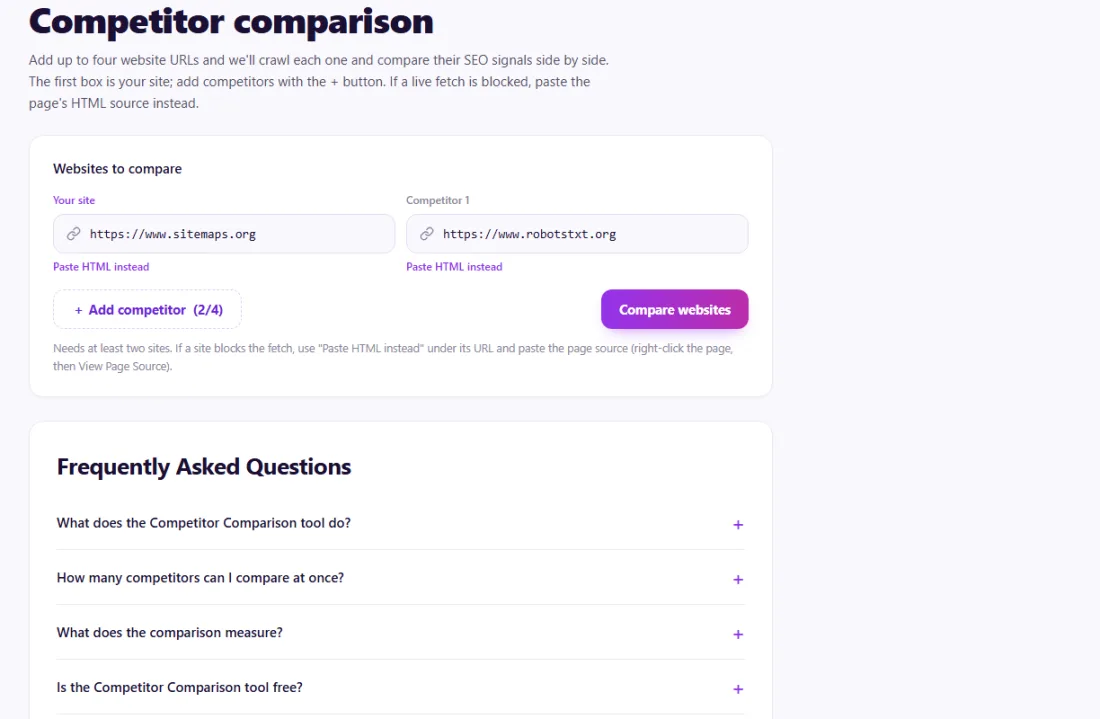
Add up to four website URLs and we'll crawl each one and compare their SEO signals side by side. The first box is your site; add competitors with the + button. If a live fetch is blocked, paste the page's HTML source instead.

Works with
  • Google
Websites to compare

Needs at least two sites. If a site blocks the fetch, use "Paste HTML instead" under its URL and paste the page source (right-click the page, then View Page Source).

Frequently Asked Questions

What does the Competitor Comparison tool do?

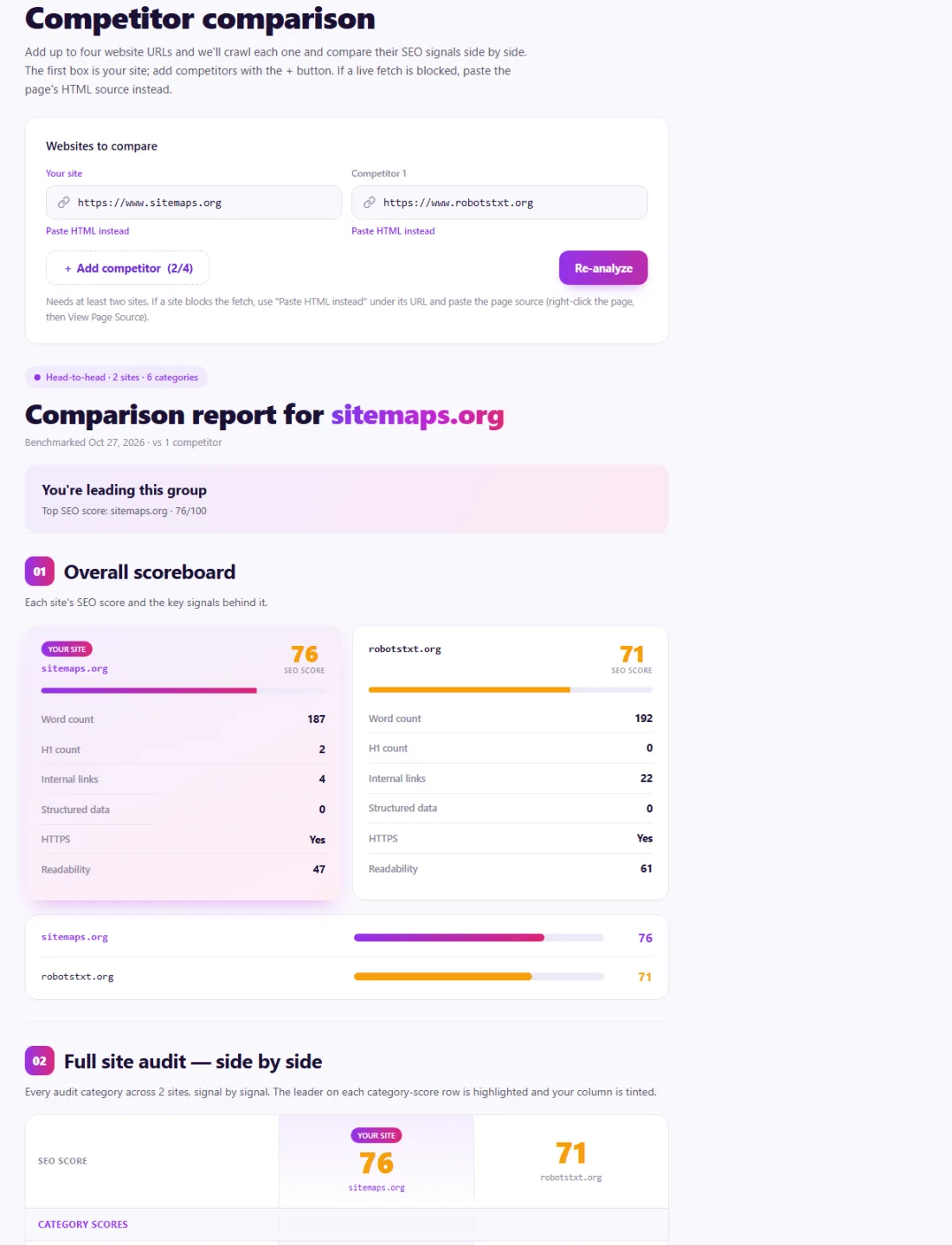
Add up to four website URLs and we crawl each one, then benchmark them across every audit category in one side-by-side report, signal by signal, so you can see exactly where you lead and where you trail.

How many competitors can I compare at once?

Up to four sites in total, including your own. Start with your site and one competitor, then use the + Add competitor button to add more, up to the limit of four columns.

What does the comparison measure?

Everything is measured directly from the pages we can fetch: a score for each audit category, plus on-page metrics such as word count, headings, internal links, structured data, HTTPS and readability. It doesn't include off-site data like backlinks, domain authority or traffic estimates, which need a web-wide link index.

Is the Competitor Comparison tool free?

Yes. Running a comparison and viewing the full side-by-side report is 100% free: no login, no paywall; fair-use limits keep the service fast for everyone.

Is my data safe and secure?

We only fetch the public URLs you provide (or use the HTML you paste) to run the comparison in your browser. We don't store the crawled content or keep a database of your reports.

What is a competitor SEO comparison?

A competitor SEO comparison looks at your website and the sites that rank against you, using the same checks for each, and lines the results up side by side. Instead of auditing your site in isolation, you see where you are ahead and where rivals do better — titles, meta descriptions, headings, content depth, technical setup, mobile readiness, structured data and social tags.

This matters because rankings are relative. A page with a few minor issues can still rank first if every competitor has bigger ones, and a technically perfect page can trail if competitors offer more complete content. Comparing directly shows which gaps are worth closing first.

It is also a fast way to learn from the pages that already win. If every top competitor uses structured data, longer content or a clearer heading structure, those are strong hints about what searchers and search engines expect for that topic.

Why use the Competitor Comparison?

Knowing your own SEO score is useful; knowing where competitors beat you is actionable. A side-by-side view of on-page and technical signals shows exactly which gaps are worth closing first.
How to use it

  1. Enter your site and up to three competitors.
  2. Wait while each site is crawled and scored with the same checks.
  3. Compare category scores and metrics, then focus on the areas where you trail.

Tips for better results

  • Compare against sites that rank for your target keywords, not just companies you know.
  • Copy patterns, not text — study structure, depth and technical setup.
  • Re-run the comparison every quarter to track progress.

Step by step, with screenshots

  1. 1Enter your site and up to three competitors.
    Step 1: Enter your site and up to three competitors.
  2. 2Each site is scored with the same checks and compared side by side.
    Step 2: Each site is scored with the same checks and compared side by side.

Features of the Competitor Comparison

Who is it for?

Understanding your results

Look first at the categories where you trail every competitor; these are usually the clearest opportunities. Areas where you lead are worth protecting but rarely need immediate work.

Remember that the comparison measures on-page and technical signals. Competitors may also have more backlinks or a stronger brand, which no page check can show. Use the comparison to fix what is in your control, then work on content quality and links.

Example: a dental clinic and three local rivals

A dental clinic in Cape Town ranked on the second page for its main treatment searches, behind three nearby clinics.

Comparing the four homepages side by side showed the clinic scoring well on speed and security but trailing every competitor on content and structured data: its homepage had about 150 words, no LocalBusiness schema and no clear headings for its treatments. The clinic added sections for each main treatment, local business markup with opening hours, and links to detailed service pages. Over the next few months it moved onto the first page for several treatment searches.

Common mistakes to avoid

More questions about the Competitor Comparison

Which competitors should I compare against?

The sites that rank for the searches you want, not only your business rivals. A blog that outranks you is a search competitor.

Why is a site missing from the comparison?

Some sites block automated tools. Paste the page's HTML source into the comparison instead.

Does a higher score mean higher rankings?

Not on its own. The comparison covers on-page and technical signals; rankings also depend on content quality, backlinks and brand.

From the blog
Duplicate Without User-Selected Canonical: What It Means and How to Fix It
Why Search Console reports duplicates with no chosen canonical, when it matters, and the fixes that settle it.
AI Crawler Checker: See Which AI Bots Can Crawl Your Website
Check, bot by bot, which AI crawlers your robots.txt allows or blocks, and create a starter llms.txt in the same place.
How to Find Low Competition Keywords for a New Website
A free, practical method to spot keywords where the current results are weak, so a new site can rank sooner.
Core Web Vitals Explained for Beginners: LCP, INP and CLS
What LCP, INP and CLS measure, the scores to aim for, and the simple fixes that make the biggest difference.
How to Update Old Blog Posts to Improve Rankings
A repeatable process for choosing which old posts to refresh and what to change so they climb back up.
Local Business Schema Markup: Example and Step-by-Step Setup
What LocalBusiness schema includes, a field-by-field example, choosing the right subtype and testing it properly.
How to Check If a Page Is Indexed by Google (4 Free Ways)
Four free ways to see whether Google has indexed a page, and what to do when it has not.
One Product Feed for Multiple Channels: Google, Facebook, Pinterest and More
How to manage one source of product data and export consistent feeds to every sales channel, without errors.
How Long Should a Blog Post Be for SEO? An Honest Answer
Why there is no magic word count, and how to decide the right length for each post from what searchers actually need.
How to Get Backlinks for a New Website (Free, Safe Methods)
Practical, free and policy-safe ways to earn your first backlinks, and the shortcuts that can get a new site penalised.