Free SEO extension 🔥

Google Discover headline generator

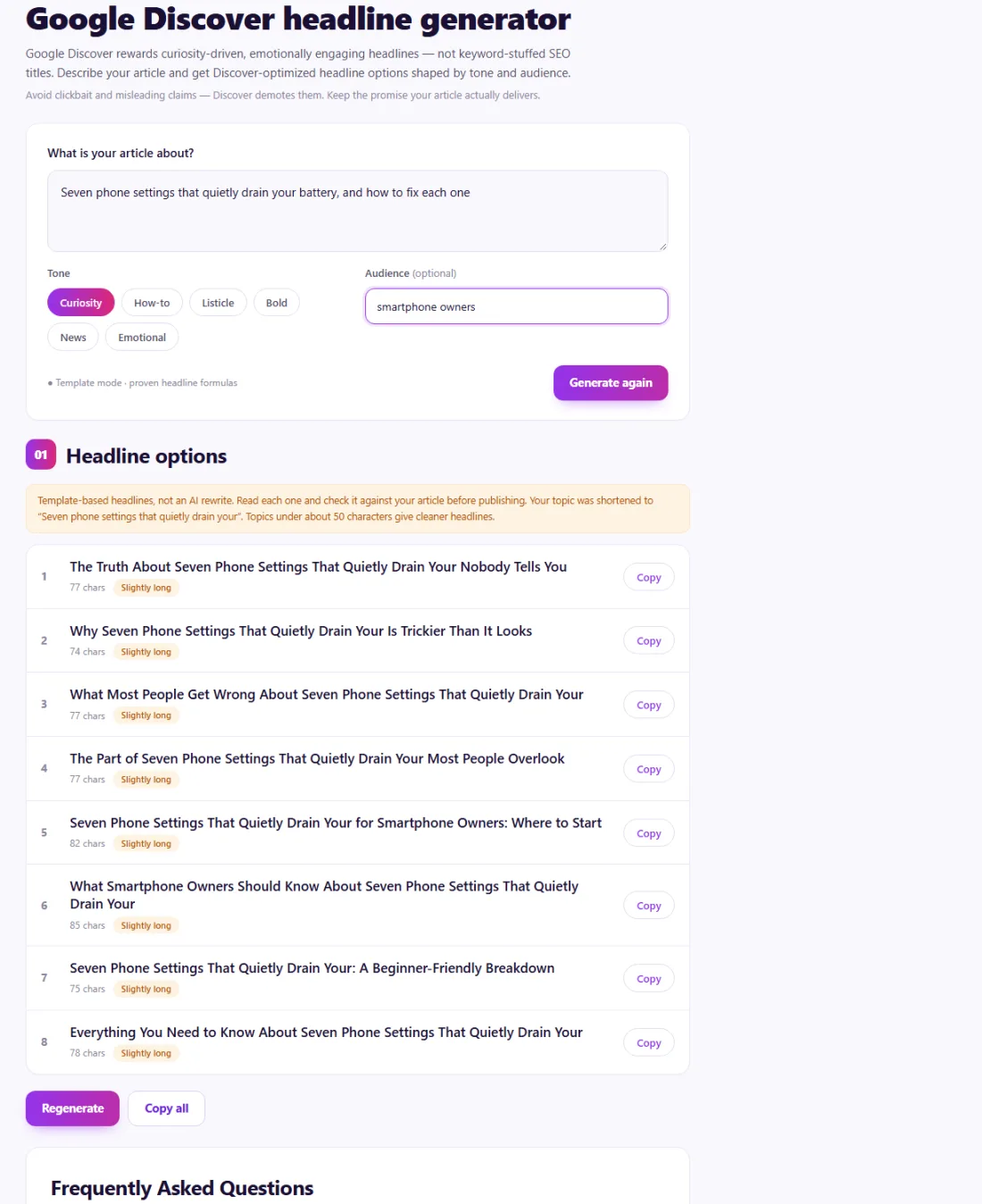
Google Discover rewards curiosity-driven, emotionally engaging headlines — not keyword-stuffed SEO titles. Describe your article and get Discover-optimized headline options shaped by tone and audience.

Works with
  • Google Discover

Avoid clickbait and misleading claims — Discover demotes them. Keep the promise your article actually delivers.

Tone
● Template mode · proven headline formulas

Frequently Asked Questions

What makes a good Google Discover headline?

Discover favors curiosity and emotion over keywords. Strong headlines front-load a hook, stay specific and accurate to the article, sit around 40–70 characters, and avoid ALL CAPS, exaggeration and misleading claims — Discover actively demotes clickbait.

How is a Discover headline different from an SEO title?

An SEO title targets a search query and leads with keywords. A Discover headline is shown to people who weren't searching for anything, so it must earn the tap through interest and relevance, reading more like an editorial headline than a keyword string.

How does this generator work?

Describe your article, pick a tone and optionally an audience, then generate. The tool fills in proven headline templates across different angles, each with a length check so you can pick the strongest and copy it in one click. Use Regenerate to get a different mix of angles.

Will these headlines guarantee I appear in Google Discover?

No tool can guarantee Discover placement — it depends on your content quality, site reputation and user interest. A strong, honest headline improves tap-through, but the article has to deliver on its promise.

Is the tool free?

Yes. Like all tools on SeoSpidie, generating Discover headlines is 100% free — no login, no paywall, no strict usage limits.

What is Google Discover?

Google Discover is the personalised feed of articles shown in the Google app and on many Android phones. Unlike search, nobody types a query: Google recommends content based on each person's interests, so headlines and images compete for attention in a scrolling feed.

Discover tends to favour timely, engaging content with large, high-quality images. Headlines that spark curiosity or promise a specific benefit perform well, but Google's Discover policies discourage clickbait, exaggeration and withholding the key information.

Because Discover traffic can arrive in sudden bursts, a strong headline and image can make a big difference for publishers and blogs.

Why use the Google Discover Headline Generator?

Google Discover shows articles to people before they search, so the headline and image do all the work of earning the click. Google's guidelines reward headlines that are specific and accurate and penalise clickbait — a narrow line to walk.
How to use it

  1. Enter your article topic and the key detail or angle.
  2. Generate headline variations in different styles.
  3. Pick the most specific, honest option and pair it with a large, high-quality image.

Tips for better results

  • Discover needs images at least 1200px wide and the max-image-preview:large robots setting.
  • Specific numbers and concrete outcomes outperform vague hype.
  • Never promise something the article does not deliver — Google treats that as clickbait.

Step by step, with screenshots

  1. 1Describe your article and get Discover-style headline options.
    Step 1: Describe your article and get Discover-style headline options.

Features of the Google Discover Headline Generator

Who is it for?

Understanding your results

Pick the most specific, honest headline — one that tells readers what they will get. Pair it with a large image at least 1,200 pixels wide and make sure your pages allow large image previews.

Keep your search title separate if needed: the on-page headline can be more engaging while the title tag stays descriptive.

Example: rewriting a flat headline

A tech blog in Bengaluru published "Smartphone Battery Tips" and saw almost no traffic from Google Discover.

The Discover Headline Generator suggested more specific, curiosity-driven options. The editor chose "7 Settings Quietly Draining Your Phone Battery (and How to Fix Them)" — honest, specific and clearly delivered by the article — and replaced the small header image with a large photo. The updated article picked up a wave of Discover visits the following week.

Common mistakes to avoid

More questions about the Google Discover Headline Generator

What is Google Discover?

A personalised feed of articles in the Google app and on many Android phones, recommended by interest rather than search.

What image size works best for Discover?

Large images at least 1,200 pixels wide, with large image previews allowed on your pages.

Can headlines be too clickbaity?

Yes. Google's Discover policies discourage misleading or exaggerated headlines; be specific and honest.
From the blog
Duplicate Without User-Selected Canonical: What It Means and How to Fix It
Why Search Console reports duplicates with no chosen canonical, when it matters, and the fixes that settle it.
AI Crawler Checker: See Which AI Bots Can Crawl Your Website
Check, bot by bot, which AI crawlers your robots.txt allows or blocks, and create a starter llms.txt in the same place.
How to Find Low Competition Keywords for a New Website
A free, practical method to spot keywords where the current results are weak, so a new site can rank sooner.
Core Web Vitals Explained for Beginners: LCP, INP and CLS
What LCP, INP and CLS measure, the scores to aim for, and the simple fixes that make the biggest difference.
How to Update Old Blog Posts to Improve Rankings
A repeatable process for choosing which old posts to refresh and what to change so they climb back up.
Local Business Schema Markup: Example and Step-by-Step Setup
What LocalBusiness schema includes, a field-by-field example, choosing the right subtype and testing it properly.
How to Check If a Page Is Indexed by Google (4 Free Ways)
Four free ways to see whether Google has indexed a page, and what to do when it has not.
One Product Feed for Multiple Channels: Google, Facebook, Pinterest and More
How to manage one source of product data and export consistent feeds to every sales channel, without errors.
How Long Should a Blog Post Be for SEO? An Honest Answer
Why there is no magic word count, and how to decide the right length for each post from what searchers actually need.
How to Get Backlinks for a New Website (Free, Safe Methods)
Practical, free and policy-safe ways to earn your first backlinks, and the shortcuts that can get a new site penalised.