
SeoSpidie
See your site the way search engines do
Paste the article you're writing and a list of your other pages. This finds the paragraphs in your draft that share the most keywords with each page — good candidates for an internal link.
Internal links connect one page of your website to another. They help visitors find related information, help search engines discover pages and understand how they relate, and pass authority from strong pages to newer or deeper ones.
The best internal links are placed inside the text, where a related topic is mentioned, with anchor text that describes the destination. A link from a well-visited guide to a newer article can help that article get crawled and ranked sooner. Pages with no internal links pointing to them — orphan pages — are often crawled rarely.
Finding linking opportunities by hand is slow on a site with many pages. Comparing the words in your draft with the topics of your existing pages surfaces the places where a link would fit naturally.
Internal links help search engines discover pages, understand how topics relate, and pass authority to the pages you care about. Most sites under-link — especially from new articles to older, important pages.
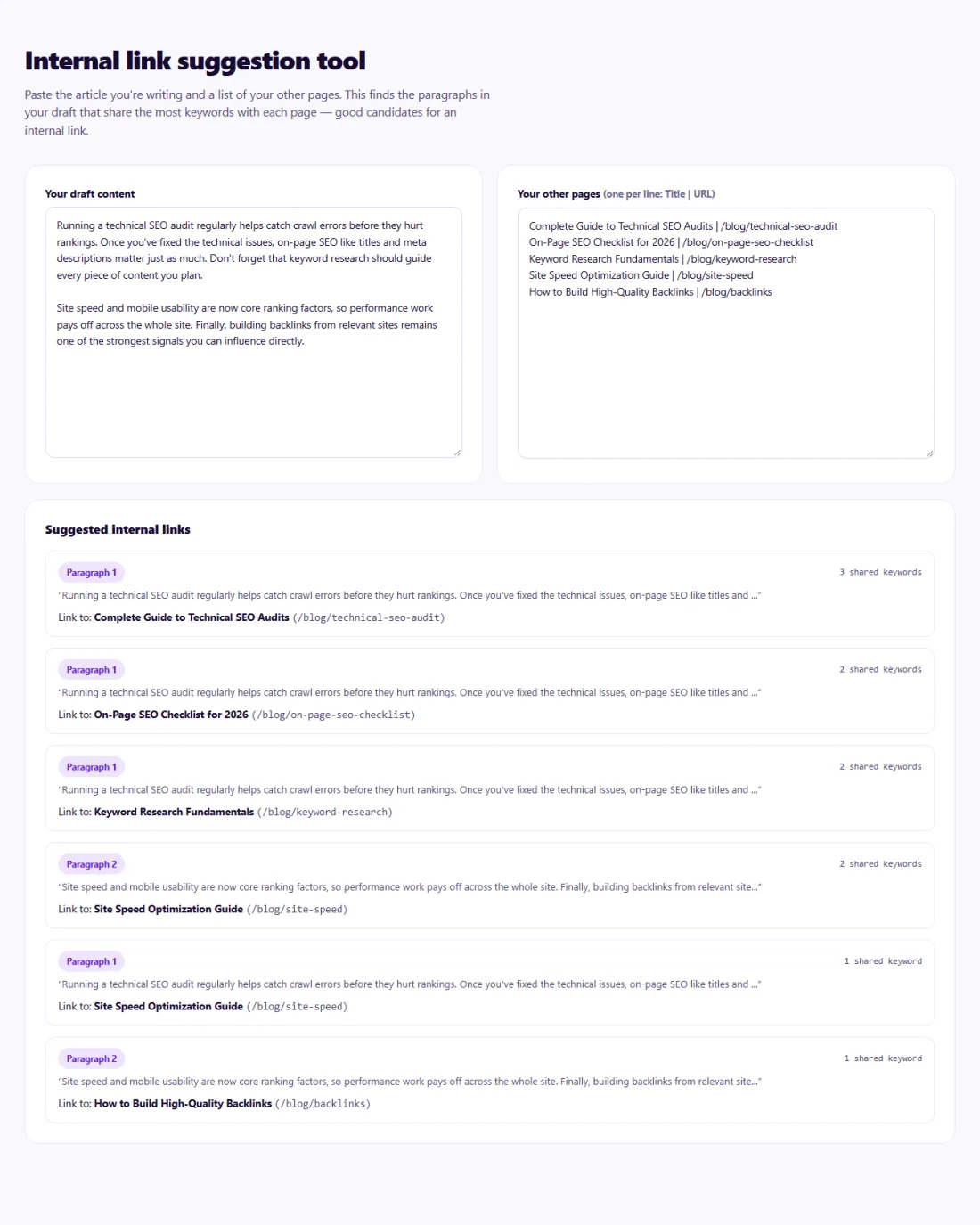
Treat suggestions as candidates, not instructions. Add a link only where it genuinely helps the reader, and choose anchor text that describes the destination page.
Two to five relevant internal links in a typical article is plenty; long guides can carry more. Also add links in the other direction: update older pages to link to the new one.
A gardening blog in New Zealand published a detailed guide to composting, but after a month it had few impressions in search.
The writer pasted the guide and a list of 60 existing posts into the Internal Link Suggestions tool. It highlighted paragraphs that matched posts on soil preparation, worm farms and vegetable beds. The writer added four links from the composting guide to those posts, then updated six older posts with links back to the new guide using descriptive anchor text. The guide was recrawled within days and began ranking for several composting questions.
By keyword overlap between your article and each target page's title or keywords, entirely in your browser.
Yes, if they stop being useful. Link where a reader would genuinely want more information.
Usually once is enough; the first link carries the most weight for anchor text.
Words that describe the destination page, such as "guide to composting", rather than "click here" or the same exact keyword every time.
Yes. Links from pages that are already crawled often help search engines find new pages faster.
Where it helps the reader, yes — it connects informational content to the pages that serve buyers.
Yes. Internal Link Suggestions runs entirely in your browser — nothing you type or paste is sent to or stored by SeoSpidie.
Yes. The Internal Link Suggestions is free to use with no sign-up. SeoSpidie is supported by advertising.
 Keyword Cannibalization CheckerIdentify pages competing for the same search terms.
 Keyword Density CheckerAnalyze keyword usage and content frequency on a page.
 Search Intent ClusterGroup keywords by search intent and build smarter content strategies.
 Meta Tag GeneratorCreate optimized title, description, robots, and meta tags.



