
SeoSpidie
See your site the way search engines do

Fill in your page details and copy ready-to-paste meta tags — with live character counters so nothing gets truncated in search results.
Meta tags are snippets of HTML in the head section of a page that describe the page to browsers, search engines and social platforms. Visitors do not see them on the page itself, but they shape how the page appears elsewhere. The two most important for search are the title tag and the meta description.
The title tag is the clickable headline in search results and the text in the browser tab. It is one of the strongest on-page signals of what a page is about, and it strongly influences whether people click. The meta description is the short summary that often appears under the title. It does not directly affect rankings, but a clear, specific description earns more clicks.
Other useful tags include the viewport tag that makes pages display properly on phones, the canonical tag that names the preferred URL, the robots tag that can keep a page out of search, and Open Graph tags that control previews on social media. The meta keywords tag, once popular, is ignored by Google.
The title tag and meta description are what people see in search results, and Open Graph tags control how links look when shared. Getting their length and wording right is one of the quickest wins in on-page SEO.
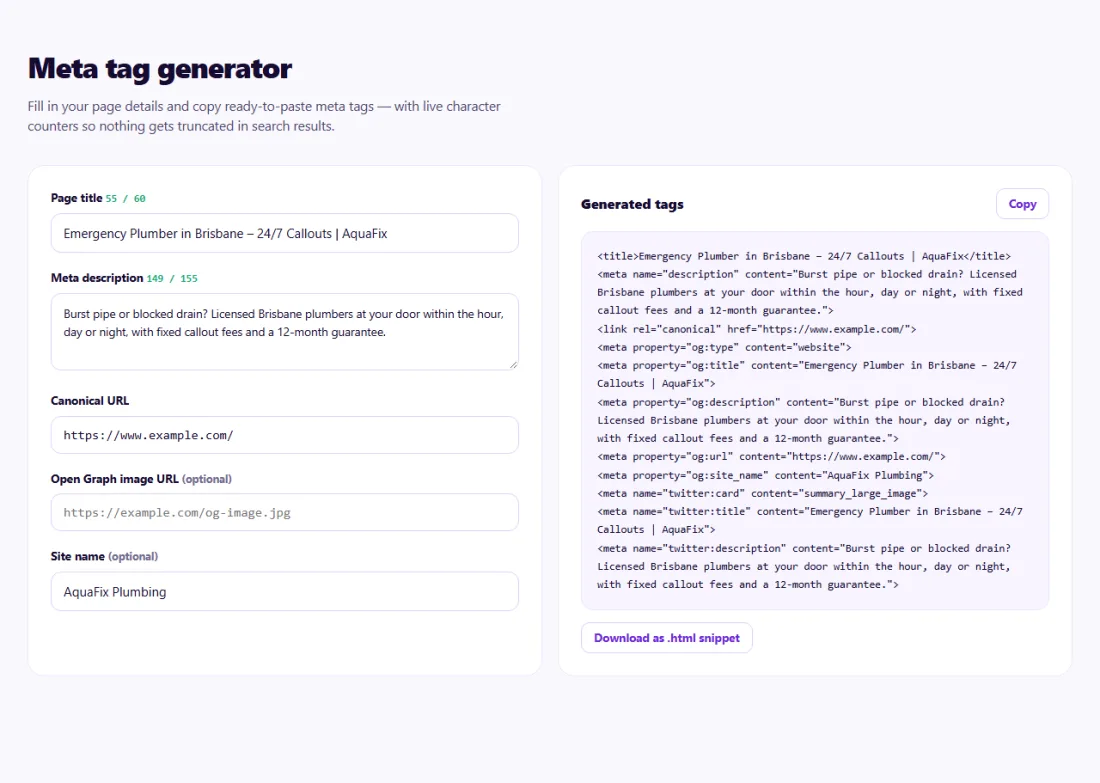
Aim for a title of roughly 50–60 characters with the main topic near the start, and a description of roughly 120–160 characters that summarises the page and gives a reason to click. Counters only approximate what Google shows, because the real limit is measured in pixels.
After publishing, search for your page and compare what Google displays. Google sometimes rewrites titles and descriptions it considers vague or unrelated to the search; a specific, accurate text is the best way to keep yours.
A plumbing company in Brisbane noticed its homepage appeared in Google as just "Home | Company Name" with a description taken from its cookie banner.
In the Meta Tag Generator the owner wrote the title "Emergency Plumber in Brisbane – 24/7 Callouts | Company Name", watching the counter to keep it under 60 characters, and a 150-character description mentioning same-day service and fixed callout fees. After the tags were added to the homepage and the page was recrawled, the search result showed the new title and description, and calls from Google increased.
Not directly, but a compelling description improves click-through rate, which is what makes rankings worth having.
Google may rewrite it to match the query better. A specific, accurate description is used more often.
No. Google has ignored the meta keywords tag for years.
About 50–60 characters is a good guide. Google cuts titles by pixel width, so put the main topic near the start.
Yes. Unique titles help search engines tell pages apart and give searchers a clear reason to click the right one.
Inside the head section of the page, or into the SEO title and description fields of your content management system or SEO plugin.
Yes. Meta Tag Generator runs entirely in your browser — nothing you type or paste is sent to or stored by SeoSpidie.
Yes. The Meta Tag Generator is free to use with no sign-up. SeoSpidie is supported by advertising.
 SERP PreviewPreview how your page could appear in search results.
 Programmatic SEO GeneratorPlan scalable SEO pages and programmatic content structures.
 Bulk SEO Audit BetaAudit up to 100 URLs at once and export the results to Excel or CSV.
 Competitor ComparisonCompare SEO signals and website performance against competitors.



