Free SEO extension 🔥

Open Graph preview

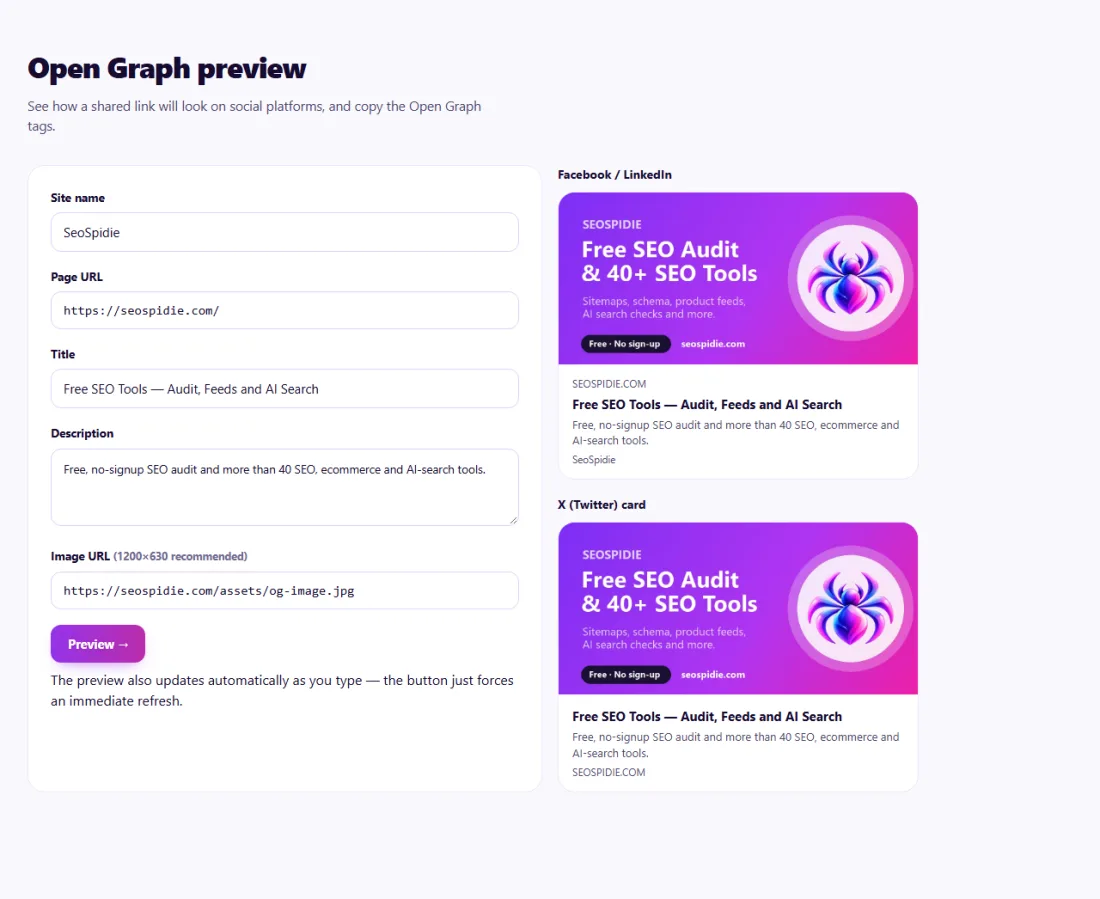
See how a shared link will look on social platforms, and copy the Open Graph tags.

Works with
  • Facebook
  • LinkedIn
  • X (Twitter)
  • WhatsApp

The preview also updates automatically as you type — the button just forces an immediate refresh.

Facebook / LinkedIn
No image set
—
—
—
—
X (Twitter) card
No image set
—
—
—

What are Open Graph tags?

Open Graph tags are meta tags that control how a link looks when it is shared on social media and messaging apps. The main ones are og:title, og:description, og:image and og:url. Facebook, LinkedIn, WhatsApp, Slack and many other platforms read them to build the preview card with a headline, short summary and image.

Without these tags, platforms guess. They may pick a logo, a random image from the page or no image at all, and they may show the wrong text. A good preview card with a clear image gets noticeably more attention in busy feeds. X (formerly Twitter) uses its own twitter: tags but falls back to Open Graph when they are missing.

Platforms also cache previews. After changing your tags, you often need to ask the platform to fetch the page again before the new image appears.

Why use the Open Graph Preview?

When a link is shared on social networks or in chat apps, Open Graph tags decide the title, description and image people see. A missing or badly sized image can halve the attention a shared link gets.
How to use it

  1. Enter the title, description, image URL and page URL.
  2. Check the previews for each platform.
  3. Copy the generated og: and twitter: tags into your page's <head>.

Tips for better results

  • Use a 1200×630 px image for the best result on most platforms.
  • Keep key text in the centre of the image; some platforms crop the edges.
  • After updating tags, use each platform's debugger to refresh its cached preview.

Step by step, with screenshots

  1. 1Enter your page details and image — see the share previews and copy the tags.
    Step 1: Enter your page details and image — see the share previews and copy the tags.

Features of the Open Graph Preview

  • Previews for social platforms. See how the card is likely to look when shared.
  • Generated tags. Copy ready-made og: and twitter: tags for your page.
  • Image check. Preview the image you plan to use before publishing.
  • Runs in your browser. Your image and text are not uploaded.

Who is it for?

  • Bloggers: make every shared post look professional.
  • Online stores: show product photos when links are shared.
  • Marketers: test share images before a campaign.
  • Developers: add correct social tags to templates.

Understanding your results

Use a large image — 1200 by 630 pixels works well across platforms — with important content away from the edges, since some apps crop it. Keep the title short and the description to a sentence or two.

After adding the tags, share the page privately or use the platform's own debugging tool to refresh its cached preview.

Example: social shares showing the wrong image

An events company in Nairobi noticed that links to its event pages shared on WhatsApp and LinkedIn showed its small logo instead of the event photo.

In the Open Graph Preview tool the team entered each event's title, description and a 1200 × 630 pixel photo, checked the previews, and copied the generated og: and twitter: tags into the event page template. After asking LinkedIn to refresh its cached preview, shared links displayed the full event photo, and clicks from shared posts rose noticeably.

Common mistakes to avoid

  • Using a small logo as the share image.
  • Using relative image paths instead of full https:// addresses.
  • Having two different og:image tags from a theme and a plugin.
  • Forgetting that platforms cache old previews.

Frequently asked questions

Why does Facebook still show the old image?

Platforms cache previews. Re-scrape the URL in Facebook's Sharing Debugger to refresh it.

Do Open Graph tags help SEO?

Not as a ranking factor, but better-looking shares earn more clicks and visibility.

Is my image uploaded?

No. Your browser loads it directly from the URL to show the preview.

What image size should I use?

A 1200 × 630 pixel image works well for most platforms. Keep important text and faces away from the edges, which some apps crop.

Do I need Twitter card tags too?

X falls back to Open Graph tags, but adding twitter:card set to summary_large_image ensures the large image layout.

Why does WhatsApp show no preview?

WhatsApp needs a public, quickly loading image and valid og: tags. Very large image files can also fail.

Is my data private?

Yes. Open Graph Preview runs entirely in your browser — nothing you type or paste is sent to or stored by SeoSpidie.

Is it free?

Yes. The Open Graph Preview is free to use with no sign-up. SeoSpidie is supported by advertising.
From the blog
Duplicate Without User-Selected Canonical: What It Means and How to Fix It
Why Search Console reports duplicates with no chosen canonical, when it matters, and the fixes that settle it.
AI Crawler Checker: See Which AI Bots Can Crawl Your Website
Check, bot by bot, which AI crawlers your robots.txt allows or blocks, and create a starter llms.txt in the same place.
How to Find Low Competition Keywords for a New Website
A free, practical method to spot keywords where the current results are weak, so a new site can rank sooner.
Core Web Vitals Explained for Beginners: LCP, INP and CLS
What LCP, INP and CLS measure, the scores to aim for, and the simple fixes that make the biggest difference.
How to Update Old Blog Posts to Improve Rankings
A repeatable process for choosing which old posts to refresh and what to change so they climb back up.
Local Business Schema Markup: Example and Step-by-Step Setup
What LocalBusiness schema includes, a field-by-field example, choosing the right subtype and testing it properly.
How to Check If a Page Is Indexed by Google (4 Free Ways)
Four free ways to see whether Google has indexed a page, and what to do when it has not.
One Product Feed for Multiple Channels: Google, Facebook, Pinterest and More
How to manage one source of product data and export consistent feeds to every sales channel, without errors.
How Long Should a Blog Post Be for SEO? An Honest Answer
Why there is no magic word count, and how to decide the right length for each post from what searchers actually need.
How to Get Backlinks for a New Website (Free, Safe Methods)
Practical, free and policy-safe ways to earn your first backlinks, and the shortcuts that can get a new site penalised.