Free SEO extension 🔥
P Pinterest Commerce Tool

Pinterest Product Feed Generator

Paste your store URL and we'll crawl your product pages, extract titles, prices, images and availability, and build a Pinterest Catalog-ready feed — no spreadsheets, no manual mapping.

Works with
  • Pinterest
🔗
✔Auto-detect product pages ✔Pinterest Catalog spec compliant ✔Export XML / CSV / TSV

We check for an existing sitemap first (via robots.txt or the default location), then fall back to following internal links. Only pages with Product/Offer structured data or a detectable price are kept — About, Contact, blog and category pages are skipped.

SeoSpidie fetches only publicly available product data to build your feed. Anything you provide is never stored or shared.

How it works

1🔗
Enter your URL
Paste your store homepage or collection URL.
2🕷️
We crawl products
Our crawler finds product pages and extracts data.
3🧩
Map to catalog
Fields map automatically to the Pinterest spec.
4⬇️
Export the feed
Download XML, CSV or TSV for Pinterest Catalogs.

What you get

📘
Catalog-ready output
Feeds follow the Pinterest Catalog product spec out of the box.
🤖
Automatic extraction
Title, description, price, availability, brand and images pulled from each page.
📄
XML, CSV or TSV
Switch formats instantly, then copy or download the file you need.
🛡️
Error-aware crawling
Pages missing a price or title are never included, and products missing an image are flagged.

Works with your platform

ShopifyWooCommerceMagentoBigCommerceWixSquarespacePrestaShopCustom HTML

Frequently Asked Questions

What is the Pinterest Product Feed Generator and how does it work? +

It crawls your store, extracts each product's title, price, availability and images, then formats everything into a feed file that matches the Pinterest Catalog product spec so you can upload it to Pinterest Catalogs.

How do I use the Pinterest Product Feed Generator? +

Paste your store URL, click "Crawl & Build Feed," review the extracted products in the preview, then copy the feed or download it as XML, CSV or TSV — ready to upload to Pinterest Catalogs.

Is the Pinterest Product Feed Generator completely free? +

Yes! Like all tools on SeoSpidie, the Pinterest Product Feed Generator is 100% free to use. There are no paywalls, no login requirements; fair-use limits keep the service fast for everyone.

Is my data safe and secure? +

Absolutely. The generator only reads publicly accessible product data to build your feed. We do not store your website data, track your internal links, or keep a database of your reports.
What is a Pinterest catalog?

Pinterest catalogs turn your products into Product Pins with prices and stock information, and power shopping ads and shopping features across Pinterest. A catalog is created from a data source — a feed file that lists each product's details.

Pinterest is a discovery platform: people browse ideas for homes, fashion, gifts and projects, often before they know which product they want. Product Pins that link to your store put your products in front of them at that moment.

Pinterest accepts feeds in XML, CSV or TSV format and can fetch them regularly, so keeping one accurate feed keeps your Product Pins up to date.

Why use the Pinterest Product Feed Generator?

A Pinterest catalog turns your products into shoppable Pins that people save and come back to. Generating the feed from your store gives Pinterest accurate titles, prices and high-quality images.

How to use it

  1. Enter your store URL.
  2. Let the tool collect your products and their data.
  3. Download the feed (XML, CSV or TSV) and add it in Pinterest Business → Catalogs.

Tips for better results

  • Pinterest favours tall images (2:3 ratio) — use them where you can.
  • Descriptive, keyword-rich titles help Pins appear in Pinterest search.
  • Host the feed at a stable URL so Pinterest can re-fetch it automatically.

Step by step, with screenshots

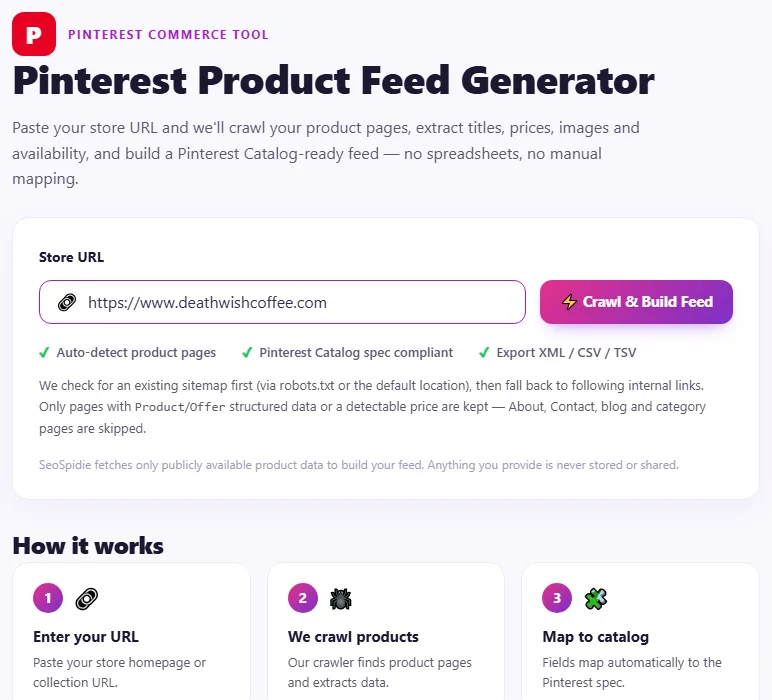
  1. 1Enter your store's address.
    Step 1: Enter your store's address.
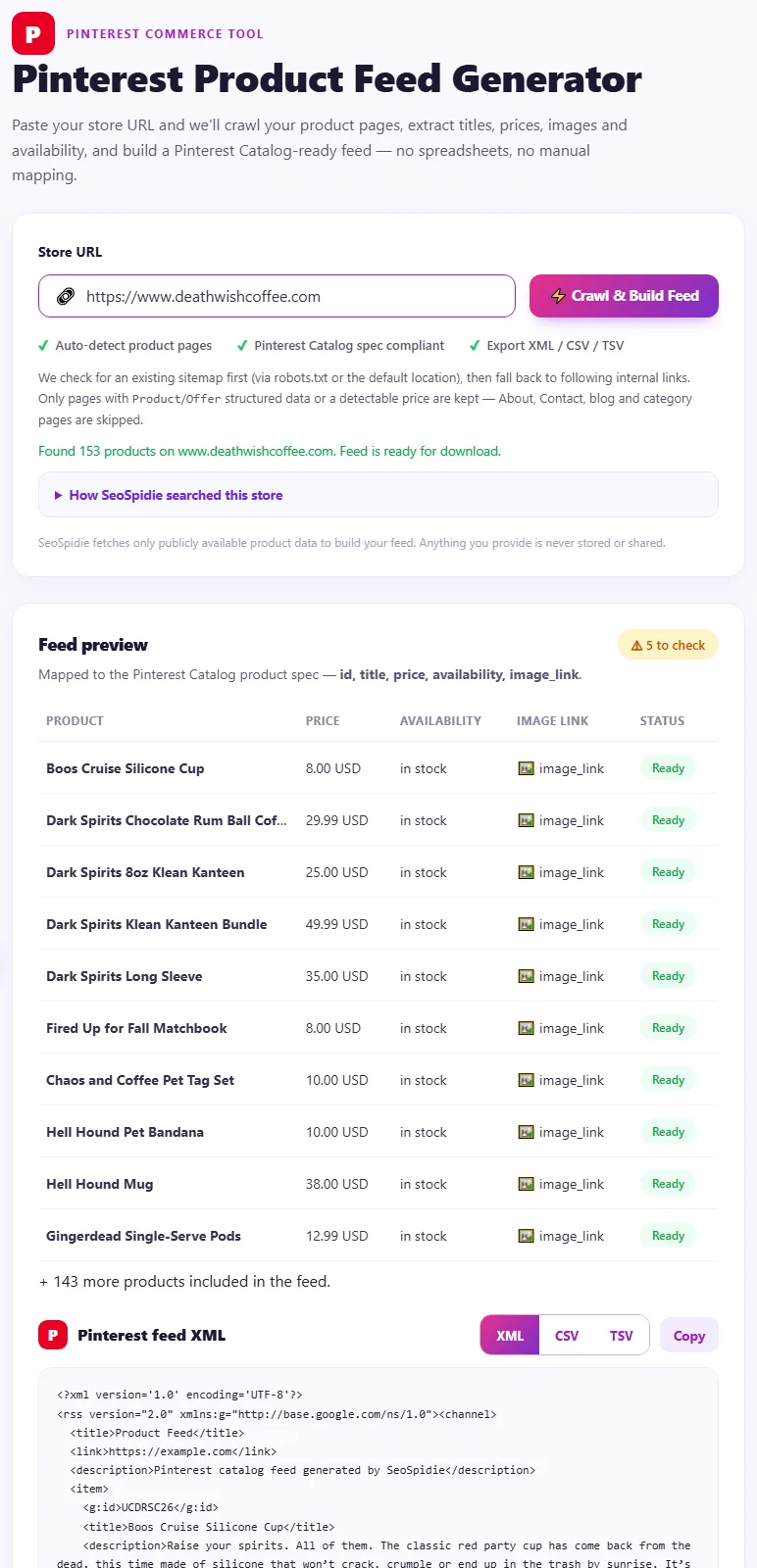
  2. 2Your products become a Pinterest catalog feed — download XML, CSV or TSV.
    Step 2: Your products become a Pinterest catalog feed — download XML, CSV or TSV.

Features of the Pinterest Product Feed Generator

  • Finds your products. Uses your sitemap or crawls your store.
  • Reads product data. Titles, prices, images and availability from your product pages.
  • Three formats. Download as XML, CSV or TSV.
  • Catalog-ready columns. Mapped to Pinterest's required fields.

Who is it for?

  • Home, fashion and gift stores: reach Pinterest's planning audience.
  • Small stores: create Product Pins without an integration.
  • Advertisers: prepare shopping ads.
  • Agencies: set up catalogs for clients.

Understanding your results

Add the feed in Pinterest Business under Catalogs, then review ingestion results. Errors usually point to missing prices, images or invalid availability values on specific products.

Use tall, high-quality lifestyle images where you can — they tend to perform well on Pinterest.

Example: turning products into Product Pins

A wall-art shop in Melbourne got steady traffic from Pinterest but only through manually created pins.

The Pinterest feed generator collected the shop's 300 prints and produced a catalogue feed. Once the feed was added under Catalogs and the website was claimed, every print became a Product Pin with its price, and Pinterest became the shop's second-largest source of sales.

Common mistakes to avoid

  • Letting prices and stock go stale.
  • Low-resolution images.
  • Feed links that redirect or require login.
  • Not claiming your website on Pinterest.

More questions about the Pinterest Product Feed Generator

Do I need to claim my website on Pinterest?

Yes. Claiming your website is required for catalogs and gives you analytics for your domain.

Which feed format should I use?

XML, CSV and TSV all work; choose whichever your workflow handles best.

How often does Pinterest update a catalog?

Pinterest fetches the feed regularly once it is added as a data source.

From the blog
Duplicate Without User-Selected Canonical: What It Means and How to Fix It
Why Search Console reports duplicates with no chosen canonical, when it matters, and the fixes that settle it.
AI Crawler Checker: See Which AI Bots Can Crawl Your Website
Check, bot by bot, which AI crawlers your robots.txt allows or blocks, and create a starter llms.txt in the same place.
How to Find Low Competition Keywords for a New Website
A free, practical method to spot keywords where the current results are weak, so a new site can rank sooner.
Core Web Vitals Explained for Beginners: LCP, INP and CLS
What LCP, INP and CLS measure, the scores to aim for, and the simple fixes that make the biggest difference.
How to Update Old Blog Posts to Improve Rankings
A repeatable process for choosing which old posts to refresh and what to change so they climb back up.
Local Business Schema Markup: Example and Step-by-Step Setup
What LocalBusiness schema includes, a field-by-field example, choosing the right subtype and testing it properly.
How to Check If a Page Is Indexed by Google (4 Free Ways)
Four free ways to see whether Google has indexed a page, and what to do when it has not.
One Product Feed for Multiple Channels: Google, Facebook, Pinterest and More
How to manage one source of product data and export consistent feeds to every sales channel, without errors.
How Long Should a Blog Post Be for SEO? An Honest Answer
Why there is no magic word count, and how to decide the right length for each post from what searchers actually need.
How to Get Backlinks for a New Website (Free, Safe Methods)
Practical, free and policy-safe ways to earn your first backlinks, and the shortcuts that can get a new site penalised.