
SeoSpidie
See your site the way search engines do
Check your product title against common SEO and marketplace best practices, then get optimized variants built from your brand, attributes and product type.
The product title is the most important text in an online listing. It decides which searches a product appears for in Google Shopping and marketplaces, and whether shoppers click. A good title names the product type clearly and includes the attributes people search for: brand, model, size, colour, material or quantity.
Order matters. Search engines and shoppers weigh the first words most, and long titles are truncated. A common structure is brand + product type + key attributes, adjusted by category: clothing buyers look for gender, size and colour; electronics buyers for model numbers and specifications.
Titles stuffed with keywords, promotional text or capital letters perform worse and may break channel policies.
The product title is the strongest relevance signal in shopping search and the first thing a buyer reads. Titles that front-load brand, product type and key attributes are matched to more searches and clicked more often.
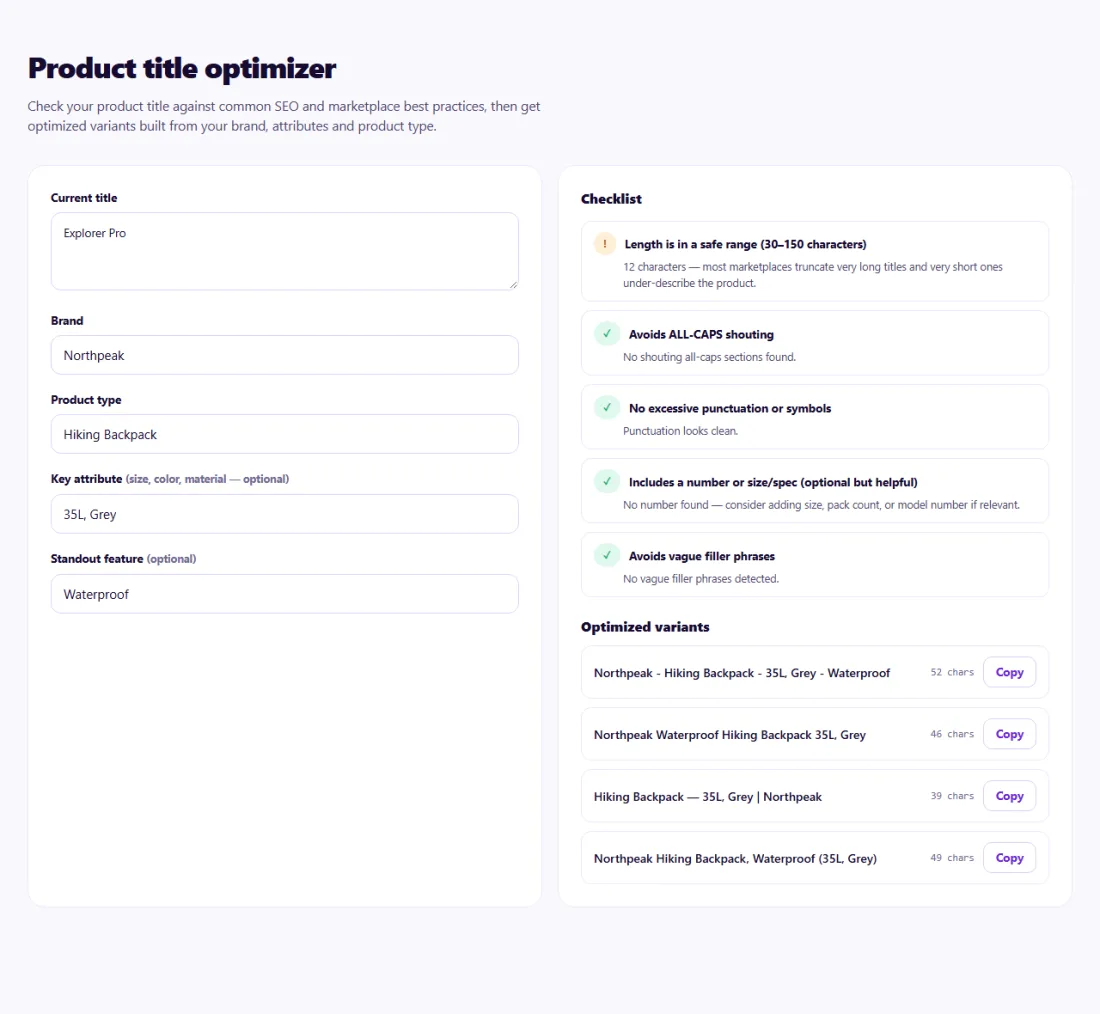
Choose a variant that leads with the words shoppers search for and keeps important attributes within the first part of the title. Use the same improved title in your store and feeds so they match.
Measure the effect over a few weeks: impressions and clicks in Merchant Center or your marketplace reports.
An online store in Canada sold a backpack titled "Explorer Pro". It got few impressions in Google Shopping.
The Product Title Optimizer flagged the missing product type and attributes. The store chose the variant "Brand Explorer Pro Hiking Backpack 35L – Waterproof, Grey", used it on the product page and in the feed, and saw impressions and clicks rise as the listing began matching searches for waterproof hiking backpacks.
Google allows up to 150 characters, but the first 70 or so are what most shoppers see.
Yes — include the distinguishing attribute, such as colour or size.
No, the analysis runs in your browser.
Often yes for well-known brands. For unknown brands, leading with the product type can match searches better.
Avoid all-caps words and promotional text; channels may limit or disapprove them.
Yes. Product Title Optimizer runs entirely in your browser — nothing you type or paste is sent to or stored by SeoSpidie.
Yes. The Product Title Optimizer is free to use with no sign-up. SeoSpidie is supported by advertising.
 Product Description GeneratorCreate SEO-friendly product descriptions that convert.
 Keyword Research ToolDiscover keyword ideas and build a stronger SEO strategy.
 Google Merchant Center Feed GeneratorGenerate product feeds for Google Merchant Center.
 Multi-Channel Feed GeneratorCreate product feeds for multiple sales and discovery channels.



