Free SEO extension 🔥

Redirect checker

Paste a list of URLs to check which ones redirect. We check each one server-side, so it works even for sites that block automated browser requests — and we show you the destination URL and status code (301 vs 302).

Works with
  • Google

Checks up to 25 URLs at a time. We don't store the URLs you submit.

0 URLs
01
Results
Advertisement · 970×90

What is a redirect?

A redirect sends visitors and search engines from one URL to another automatically. Redirects are essential whenever a page moves: when you change a URL, merge two articles, switch from HTTP to HTTPS or move to a new domain. Without them, old links and bookmarks lead to error pages and the ranking value those links carried is lost.

The status code tells search engines what kind of move it is. A 301 (or 308) means the move is permanent, so search engines transfer signals to the new address and eventually show it in results. A 302 (or 307) means the move is temporary, so the original URL usually stays indexed. Using the wrong type sends mixed signals and can delay the change.

Problems appear when redirects pile up. A chain — page A to B to C — slows visitors down and makes crawlers work harder. A loop — A to B and back to A — never reaches a page at all. Both are common after several redesigns or when a plugin, a CDN and the server each add their own redirect rules.

Why use the Redirect Checker?

Redirects keep visitors and link value flowing when URLs change — but the wrong type (302 instead of 301), chains of several hops, or loops quietly cost traffic. Checking them shows exactly where a URL ends up and how.
How to use it

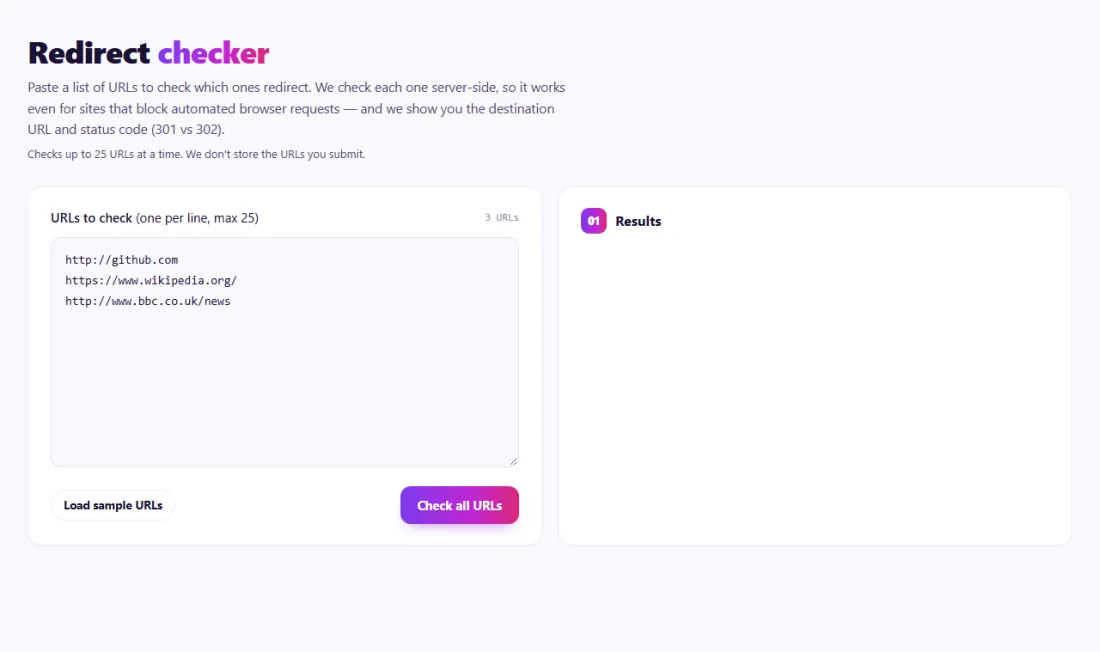
  1. Enter one or more URLs.
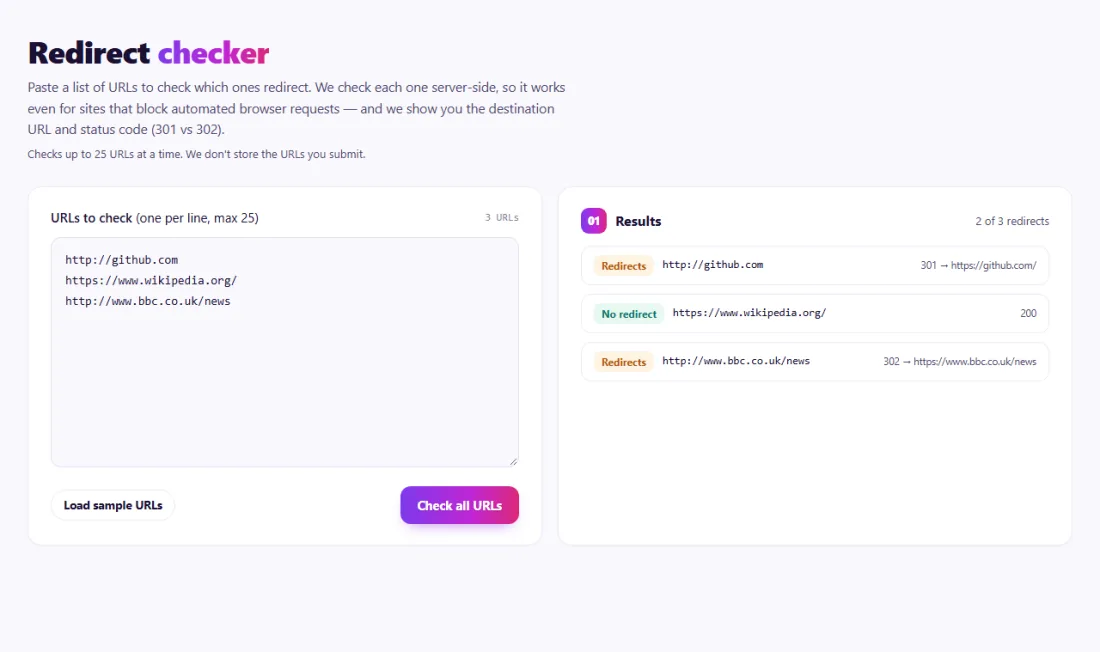
  2. Run the check to see each hop, its status code and the final destination.
  3. Replace chains with a single 301 to the final URL and fix any loops or errors.

Tips for better results

  • Use 301 for permanent moves, 302/307 only for genuinely temporary ones.
  • Update internal links to point straight at the final URL.
  • Check http→https and www→non-www variants of your homepage.

Step by step, with screenshots

  1. 1Paste the URLs you want to check, one per line.
    Step 1: Paste the URLs you want to check, one per line.
  2. 2See which URLs redirect, the status code and the final destination.
    Step 2: See which URLs redirect, the status code and the final destination.

Features of the Redirect Checker

  • Checks many URLs at once. Paste a list of addresses and check them in one go.
  • Server-side checks. Each URL is checked by SeoSpidie's server, so it works even when a site blocks requests made directly from a browser.
  • Status codes. See whether each URL answers with a redirect and which code it uses, such as 301 or 302.
  • Destination. See where each redirect points.
  • No sign-up. Free to use, with nothing stored after the check.

Who is it for?

  • Site owners after a migration: confirm that every old URL now points to the right new page.
  • SEO specialists: find temporary redirects that should be permanent.
  • Marketers: check that campaign and short links land where they should.
  • Developers: verify redirect rules after server or CDN changes.

Understanding your results

"No redirect" with a 200 status means the URL loads directly — ideal for pages you link to. "Redirects" shows the status code and the destination. A 301 or 308 to the correct page is fine; a 302 or 307 for a permanent move should be changed to a 301.

If a destination itself redirects again, you have a chain: point the first URL straight at the final page and update your internal links so they skip the redirect entirely. Any error result means the URL could not be reached and needs attention.

Example: checking redirects after a site move

A travel blog in Melbourne moved from an old platform to a new one and changed its post URLs from /2019/05/post-name to /blog/post-name. A plugin created the redirects automatically.

The owner pasted twenty of the most-linked old URLs into the Redirect Checker. Most showed a single 301 to the right new address, but six used a temporary 302, and three pointed to the homepage because the plugin could not match their titles. The owner switched the plugin to 301 redirects and added the three missing redirects by hand. Old URLs then disappeared from Google results and the new ones took their place.

Common mistakes to avoid

  • Redirecting every removed page to the homepage instead of the closest relevant page.
  • Using temporary 302 redirects for permanent moves because a plugin defaults to them.
  • Leaving internal links pointing at old URLs, so every click goes through a redirect.
  • Removing redirects a few months after a migration while old links still exist.
  • Forgetting the http and www variants of your homepage.

More questions about the Redirect Checker

What is the difference between a 301 and a 302 redirect?

A 301 tells search engines the move is permanent, so they transfer signals to the new URL. A 302 says it is temporary, so the original URL usually stays indexed.

How long should I keep redirects in place?

At least a year, and permanently for pages that have backlinks or still receive visits from old links and bookmarks.

Do redirects slow down my site?

Each redirect adds a round trip before the page loads. One is barely noticeable; chains of several redirects add up, so link straight to final URLs.

Frequently Asked Questions

What is the Redirect Checker and how does it work? +

The Redirect Checker is a browser-based utility for verifying URL redirects. It sends each URL to our server, which checks it directly (without following the redirect) and reports back whether it redirects, to where, and with what status code.

How do I use the Redirect Checker? +

Paste one URL per line into the box above and click "Check all URLs." Results appear as each check completes, showing whether it redirects, the destination, and the HTTP status code.

Why do redirect chains hurt SEO? +

Each extra hop adds latency, wastes crawl budget, and can dilute link signals. Google recommends pointing redirects straight to the final destination — ideally a single 301 — instead of chaining through several URLs.

Is the Redirect Checker completely free? +

Yes! Like all tools on SeoSpidie, the Redirect Checker is 100% free to use. There are no paywalls and no login requirements. Each check is capped at 25 URLs to keep results fast.

Is my data safe and secure? +

We don't store the URLs you submit or the results. Each check is made on demand and discarded once the response is sent back to your browser.


From the blog
Duplicate Without User-Selected Canonical: What It Means and How to Fix It
Why Search Console reports duplicates with no chosen canonical, when it matters, and the fixes that settle it.
AI Crawler Checker: See Which AI Bots Can Crawl Your Website
Check, bot by bot, which AI crawlers your robots.txt allows or blocks, and create a starter llms.txt in the same place.
How to Find Low Competition Keywords for a New Website
A free, practical method to spot keywords where the current results are weak, so a new site can rank sooner.
Core Web Vitals Explained for Beginners: LCP, INP and CLS
What LCP, INP and CLS measure, the scores to aim for, and the simple fixes that make the biggest difference.
How to Update Old Blog Posts to Improve Rankings
A repeatable process for choosing which old posts to refresh and what to change so they climb back up.
Local Business Schema Markup: Example and Step-by-Step Setup
What LocalBusiness schema includes, a field-by-field example, choosing the right subtype and testing it properly.
How to Check If a Page Is Indexed by Google (4 Free Ways)
Four free ways to see whether Google has indexed a page, and what to do when it has not.
One Product Feed for Multiple Channels: Google, Facebook, Pinterest and More
How to manage one source of product data and export consistent feeds to every sales channel, without errors.
How Long Should a Blog Post Be for SEO? An Honest Answer
Why there is no magic word count, and how to decide the right length for each post from what searchers actually need.
How to Get Backlinks for a New Website (Free, Safe Methods)
Practical, free and policy-safe ways to earn your first backlinks, and the shortcuts that can get a new site penalised.