Free SEO extension πŸ”₯

Schema markup generator

Generate valid JSON-LD structured data for rich results. Pick a type, fill in the fields, and paste the script into your page's <head>. Helps Google and AI answer engines understand your content.

Works with
  • Google
Schema type β€” 13 types
Organization details

Example values are filled in β€” replace them with your own details before publishing.

JSON-LD

                
    How to use: paste the code inside the page’s <head> (or anywhere in <body>), publish, then test the page in Google’s Rich Results Test or the Schema.org validator. Only describe things that are visible on the page.

    Frequently Asked Questions

    What is schema markup (structured data)? +

    Schema markup is code β€” usually JSON-LD β€” that describes your page's content to search engines using the shared vocabulary at schema.org. It can unlock rich results like review stars, FAQs, breadcrumbs and product info.

    How do I add the generated code to my site? +

    Copy the JSON-LD script and paste it into the head (or anywhere in the body) of the relevant page. One block per page/entity is fine, and you can include multiple types on a page when appropriate.

    Which schema type should I use? +

    Match the page: Organization and WebSite for your home page, LocalBusiness for a shop or office, Product for product pages, Article for blog posts and news, FAQPage for Q&A sections, BreadcrumbList for the navigation trail, Event for events, Recipe for recipes, VideoObject for videos, JobPosting for job openings, Person for author pages and SoftwareApplication for apps. You can add more than one block to a page.

    Does structured data help with AI search? +

    Yes. Clear structured data helps AI answer engines and Google's AI Overviews parse entities, facts and relationships, improving your chances of being cited accurately.

    How do I test my markup? +

    Run the output through Google's Rich Results Test and the Schema.org validator to confirm it's valid and eligible for rich results before publishing.

    Is the Schema Markup Generator completely free and unlimited? +

    Yes! Like all tools on SeoSpidie, it's 100% free to use. There are no paywalls, no login requirements, and no strict usage limits.

    Is my data safe and secure? +

    Absolutely. The generator runs entirely in your browser. We do not store what you type or keep a database of your markup.

    What is schema markup?

    Schema markup, also called structured data, is code that describes the content of a page in a standard vocabulary from schema.org. It tells search engines precisely what a page contains β€” a product with a price and availability, an article with an author and date, a local business with opening hours, an event with a location and time.

    Search engines use structured data to understand pages more reliably and, for supported types, to show rich results: product prices and ratings, breadcrumbs, event details, recipe information and more. AI answer engines can also use clearly labelled facts when summarising information.

    Google recommends the JSON-LD format, a script block placed in the page's HTML that does not change what visitors see. The markup must match the visible content: marking up reviews, prices or questions that are not on the page breaks Google's guidelines.

    Why use the Schema Markup Generator?

    Structured data (JSON-LD) tells search engines precisely what a page is about β€” a product, an article, a business, a set of FAQs. It is required for many rich results, such as product prices and review stars, and helps AI systems understand your content.
    How to use it

    1. Choose one of 13 schema types β€” Organization, Local Business, Product, Article, FAQ, Breadcrumb, Event, Recipe, Video, Job Posting, Person, Website or Software App.
    2. Fill in the fields marked Required (and Recommended where you can); the JSON-LD code and the rich-result checks update as you type.
    3. Fix anything listed in red, then copy or download the script and paste it into the page's HTML.
    4. Test the published page in Google's Rich Results Test.

    Tips for better results

    • Only mark up content that is visible on the page.
    • Validate with Google's Rich Results Test before publishing.
    • Use one consistent Organization schema across the site.

    Step by step, with screenshots

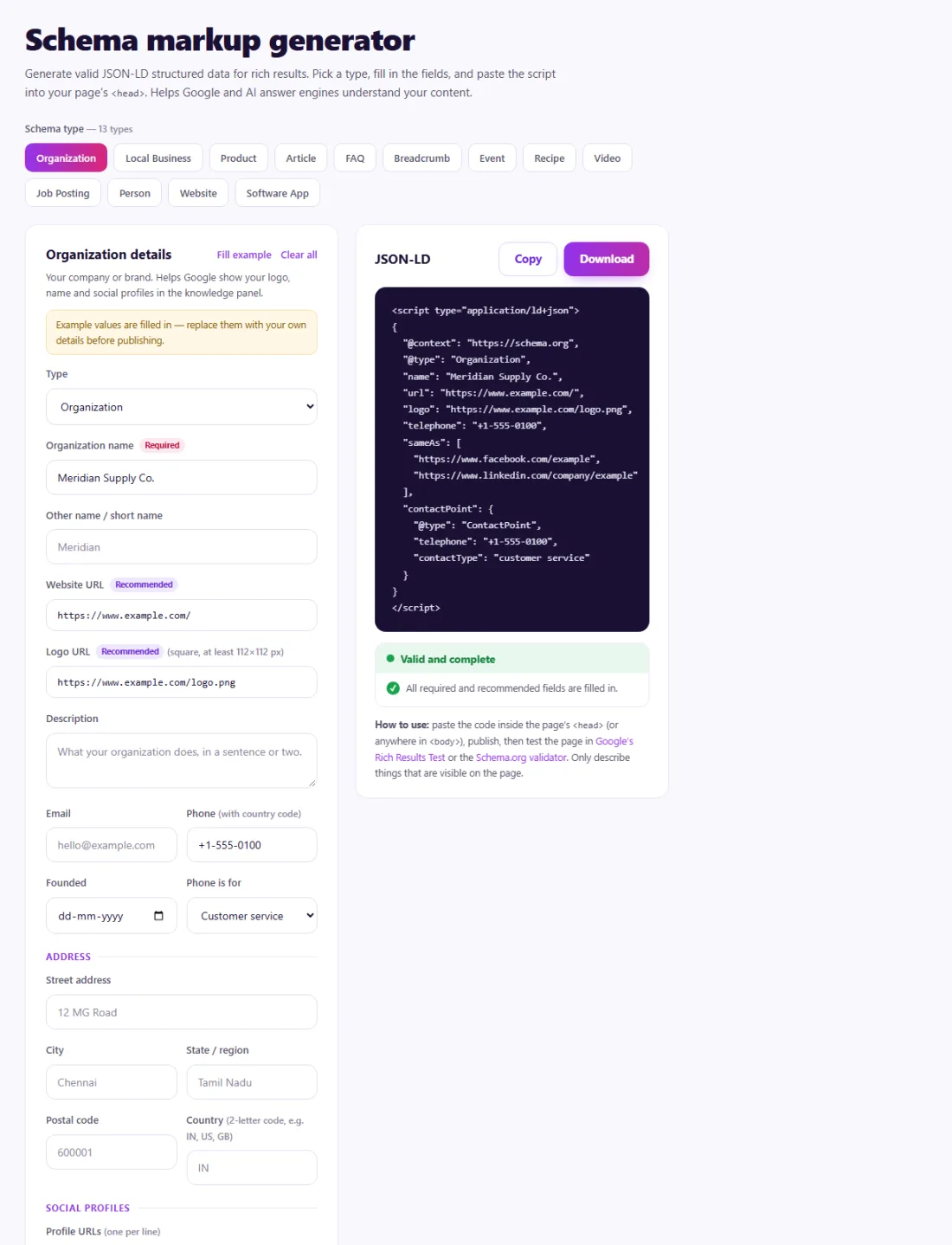
    1. 1Pick a schema type and fill in the fields β€” the JSON-LD and checks update as you type.
      Step 1: Pick a schema type and fill in the fields β€” the JSON-LD and checks update as you type.

    Features of the Schema Markup Generator

    • 13 schema types. Organization, Local Business, Product, Article, FAQ, Breadcrumb, Event, Recipe, Video, Job Posting, Person, Website and Software App.
    • Required and recommended fields. Fields are labelled so you know what Google needs.
    • Live JSON-LD. The code updates as you type.
    • Built-in checks. Problems are listed in red before you copy the code.
    • Copy or download. Paste the script into your page; everything runs in your browser.

    Who is it for?

    • Local businesses: describe your address, hours and contact details.
    • Online stores: add product data such as price, availability and identifiers.
    • Bloggers and publishers: mark up articles, authors and breadcrumbs.
    • Developers: produce valid JSON-LD quickly for templates.

    Understanding your results

    The generated script is ready to paste into your page's HTML. Fix every item flagged in red first β€” missing required fields make the markup ineligible for rich results. Recommended fields are optional but make the result more complete.

    After publishing, test the live page in Google's Rich Results Test and watch the enhancement reports in Search Console. Valid markup makes a page eligible for rich results, but Google decides when to show them.

    Example: adding local business markup

    A bakery in Lyon wanted Google to show its correct opening hours and address, which often appeared outdated in search.

    The owner chose the Local Business type in the Schema Generator, filled in the business name, address, phone number, opening hours for each day and the website URL, and fixed the one field the checks flagged in red β€” a missing postal code. The generated JSON-LD was pasted into the homepage, and Google's Rich Results Test confirmed it was valid. The owner also kept the hours on the Google Business Profile identical, so every source agreed.

    Common mistakes to avoid

    • Marking up content that is not visible on the page.
    • Adding the same Organization markup with different details on many pages.
    • Copying markup between pages without updating names, prices and dates.
    • Expecting rich results immediately β€” eligibility is not a guarantee.

    More questions about the Schema Markup Generator

    Can I use more than one schema type on a page?

    Yes. A product page can carry Product and BreadcrumbList markup, for example. Each type should describe content that is visible on the page.

    Where in the page does JSON-LD go?

    Anywhere in the HTML, usually in the head or just before the closing body tag. It does not change what visitors see.


    From the blog
    Duplicate Without User-Selected Canonical: What It Means and How to Fix It
    Why Search Console reports duplicates with no chosen canonical, when it matters, and the fixes that settle it.
    AI Crawler Checker: See Which AI Bots Can Crawl Your Website
    Check, bot by bot, which AI crawlers your robots.txt allows or blocks, and create a starter llms.txt in the same place.
    How to Find Low Competition Keywords for a New Website
    A free, practical method to spot keywords where the current results are weak, so a new site can rank sooner.
    Core Web Vitals Explained for Beginners: LCP, INP and CLS
    What LCP, INP and CLS measure, the scores to aim for, and the simple fixes that make the biggest difference.
    How to Update Old Blog Posts to Improve Rankings
    A repeatable process for choosing which old posts to refresh and what to change so they climb back up.
    Local Business Schema Markup: Example and Step-by-Step Setup
    What LocalBusiness schema includes, a field-by-field example, choosing the right subtype and testing it properly.
    How to Check If a Page Is Indexed by Google (4 Free Ways)
    Four free ways to see whether Google has indexed a page, and what to do when it has not.
    One Product Feed for Multiple Channels: Google, Facebook, Pinterest and More
    How to manage one source of product data and export consistent feeds to every sales channel, without errors.
    How Long Should a Blog Post Be for SEO? An Honest Answer
    Why there is no magic word count, and how to decide the right length for each post from what searchers actually need.
    How to Get Backlinks for a New Website (Free, Safe Methods)
    Practical, free and policy-safe ways to earn your first backlinks, and the shortcuts that can get a new site penalised.