
SeoSpidie
See your site the way search engines do

Type your title and description to see exactly how the listing will look in Google — and whether it'll get cut off.
Google usually shows 50–60 characters of a title and 120–158 characters of a description before truncating with an ellipsis.
SERP stands for search engine results page. Each result on that page is a snippet: a title, the page address and a short description. The snippet is your page's first impression — searchers decide in a second or two whether it matches what they are looking for.
Search engines truncate titles and descriptions that are too long, replacing the end with an ellipsis. The limit is based on pixel width rather than a fixed number of characters, so a title full of wide letters such as W and M is cut sooner than one with narrow letters. Mobile and desktop results also have different widths.
Previewing a snippet before publishing lets you put the most important words where they will be seen, avoid awkward cut-offs and compare alternatives. A clearer snippet can raise your click-through rate without any change in ranking.
Your title and description are your advert in the search results. Previewing them at real desktop and mobile widths shows where they will be truncated, so the most important words are always visible.
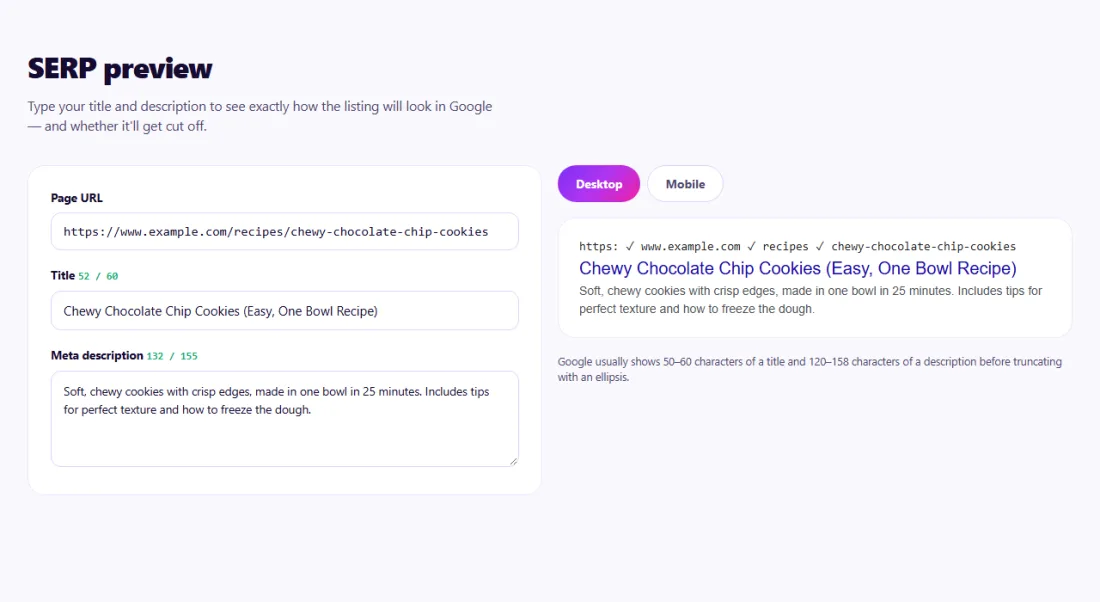
If the preview shows an ellipsis, the end of your text will not be visible. Move the key information — the topic, the benefit, the brand if it matters — to the beginning, and shorten the rest.
The preview is a close approximation, not a guarantee. Google may display a different title or description, especially when it thinks another text on your page better matches a particular search. Use the preview to write clear, accurate text, then check the real result after the page is indexed.
A food blogger in Toronto wrote the title "The Absolute Best Easy Homemade Chocolate Chip Cookies Recipe You Will Ever Make" for a popular recipe.
The SERP Preview showed the title cut off after "Homemade Chocolate" on mobile, hiding the most important words. The blogger rewrote it as "Chewy Chocolate Chip Cookies (Easy, One Bowl Recipe)", which fit on both desktop and mobile and still described what made the recipe different. The new title showed in full and the click-through rate in Search Console improved over the following month.
It is a close approximation. Google may rewrite titles and descriptions to match a query.
Mobile results have different widths and line limits, so text is truncated at different points.
No — the preview is rendered in your browser.
Search results have a fixed width, and letters have different widths, so a title of wide letters is cut sooner than one of narrow letters.
Not directly, but it can improve click-through rate, which brings more visitors from the same position.
The preview shows the title, URL and description. Google also displays a site name and favicon, which come from your homepage and site settings.
Yes. SERP Preview runs entirely in your browser — nothing you type or paste is sent to or stored by SeoSpidie.
Yes. The SERP Preview is free to use with no sign-up. SeoSpidie is supported by advertising.
 Programmatic SEO GeneratorPlan scalable SEO pages and programmatic content structures.
 Bulk SEO Audit BetaAudit up to 100 URLs at once and export the results to Excel or CSV.
 Competitor ComparisonCompare SEO signals and website performance against competitors.
 Bulk Indexability CheckerCheck indexability signals across multiple URLs.



