Free SEO extension 🔥

Sitemap generator

Type your website's URL — SeoSpidie first checks for an existing sitemap.xml (via robots.txt or the default location), which is faster and more complete than crawling. If none exists, it falls back to crawling every internal link it finds until there are no new pages left — or paste your own list manually. Larger sites can take a while since every page goes through the same fetch process as the rest of SeoSpidie.

Works with
  • Google Search Console
  • Bing

What is an XML sitemap?

An XML sitemap is a file that lists the pages on your website that you want search engines to find. Each entry holds a page address and, optionally, the date it was last changed. Search engines read the sitemap alongside the links they discover while crawling, which helps them find new pages sooner and notice when existing pages are updated.

Sitemaps matter most for new websites with few links pointing to them, large sites with thousands of pages, and sites where some pages are only reachable through search or filters. They are also a diagnostic tool: when you submit a sitemap in Google Search Console or Bing Webmaster Tools, the reports show how many of the listed pages are actually indexed.

A good sitemap only contains canonical pages that return a normal 200 status — no redirects, no 404 pages, no noindexed pages and no duplicate parameter URLs. A single sitemap file can hold up to 50,000 URLs; larger sites split their URLs across several files and list them in a sitemap index.

Why use the XML Sitemap Generator?

An XML sitemap lists the URLs you want search engines to know about. It speeds up discovery of new pages and is especially important for large sites, new sites with few links, and pages that are hard to reach through navigation.
How to use it

  1. Paste your URLs or enter your site to collect them automatically.
  2. Optionally set change frequency and priority.
  3. Download sitemap.xml, upload it to your root, and submit it in Google Search Console and Bing Webmaster Tools.

Tips for better results

  • Include only canonical, indexable URLs that return 200.
  • Reference the sitemap in robots.txt with a Sitemap: line.
  • Split sitemaps over 50,000 URLs and use a sitemap index.

Step by step, with screenshots

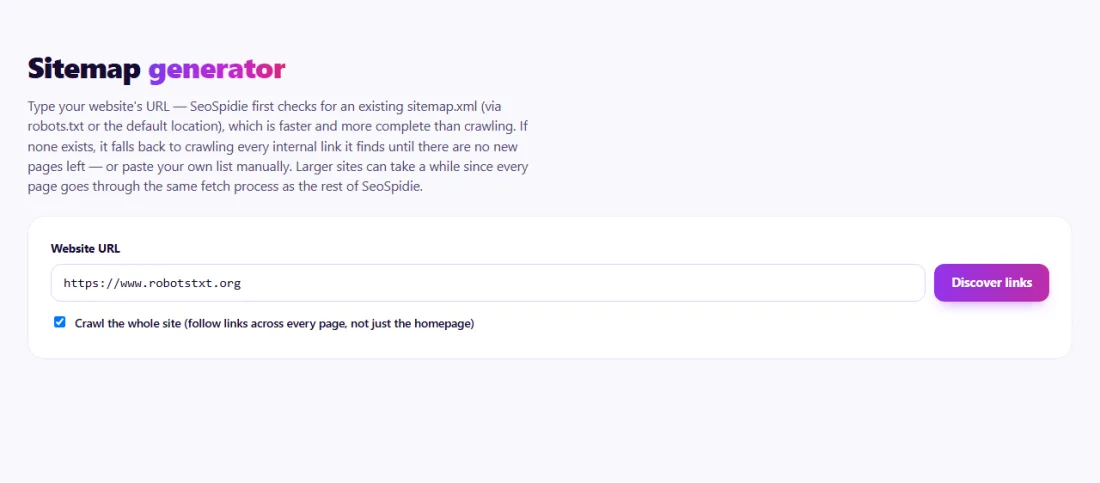
  1. 1Enter your site — an existing sitemap is used first, otherwise your links are crawled.
    Step 1: Enter your site — an existing sitemap is used first, otherwise your links are crawled.
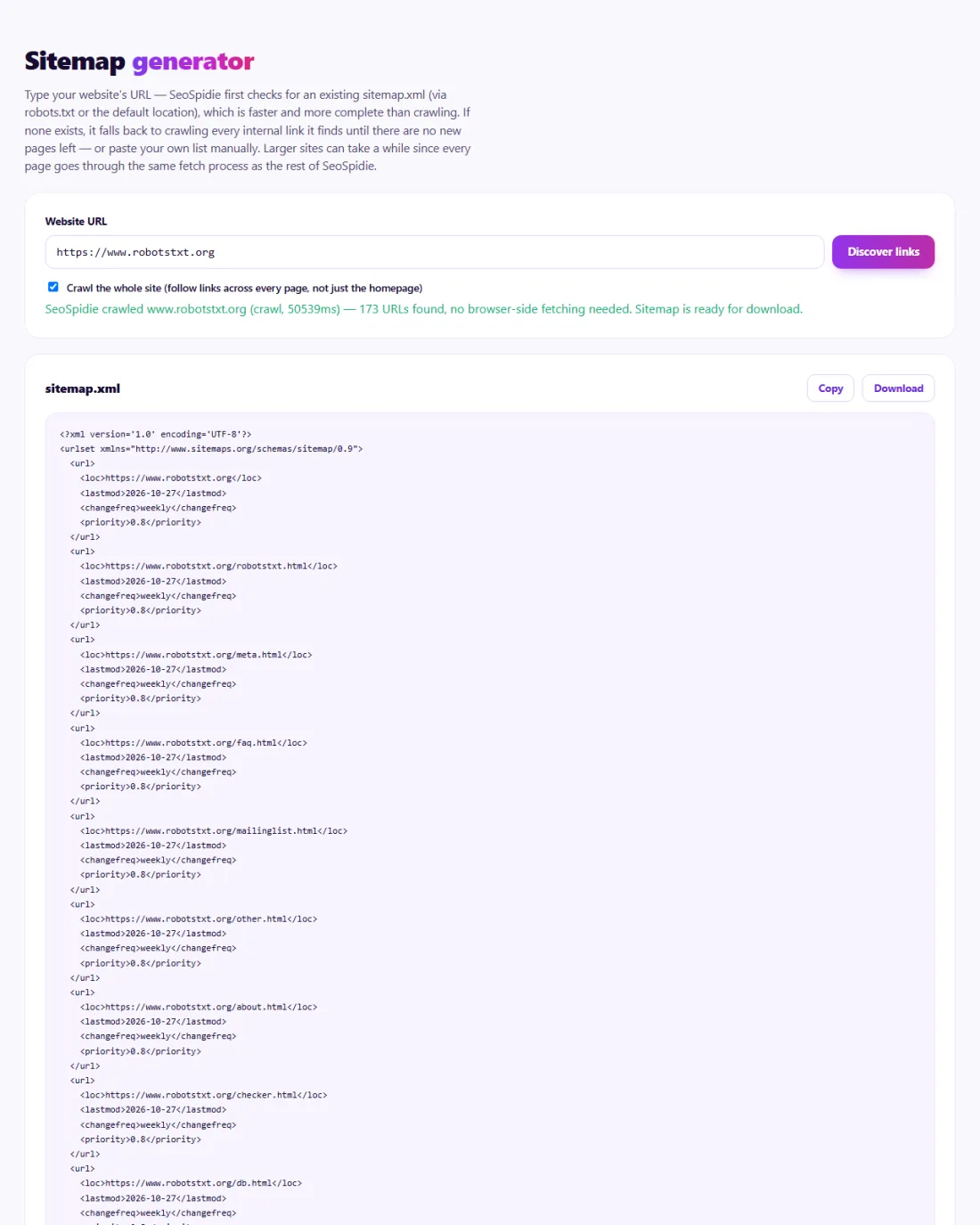
  2. 2Review the URLs found, then download sitemap.xml.
    Step 2: Review the URLs found, then download sitemap.xml.

Features of the XML Sitemap Generator

  • Finds your existing sitemap first. It checks robots.txt and the default sitemap location, which is faster and more complete than crawling.
  • Falls back to crawling. If there is no sitemap, it follows your internal links until no new pages turn up, respecting robots.txt.
  • Manual list option. Paste your own list of URLs instead of crawling.
  • Optional settings. Set change frequency and priority values if you want them in the file.
  • Ready-to-upload file. Download a valid sitemap.xml to place at the root of your site.

Who is it for?

  • New websites: help Google and Bing discover every page before many links point to the site.
  • Custom-built sites: get a sitemap when your platform does not create one.
  • Site owners after a redesign: produce a fresh list of the URLs that now exist.
  • SEO specialists: compare the pages a crawl can reach with the pages you expected.

Understanding your results

The page count tells you how many URLs were found. If the number is much lower than the pages you know exist, some pages are not linked from anywhere on your site — they are orphan pages, and they deserve internal links. If it is much higher, crawling probably found parameter or duplicate URLs that should not be in a sitemap.

After uploading, submit the sitemap address in Search Console and Bing Webmaster Tools, add a Sitemap line to robots.txt, and watch the indexing reports over the following weeks.

Example: a consultant's custom-built website

A management consultant in Toronto had a hand-coded website with 40 pages and no sitemap. Search Console showed only 22 pages indexed, and two new service pages had never appeared in Google.

The generator found no existing sitemap, so it crawled the site's internal links and collected 36 URLs. Comparing that list with the site's files revealed four pages that no other page linked to — including the two new service pages. The consultant linked them from the services menu, regenerated the sitemap, uploaded it and submitted it in Search Console and Bing Webmaster Tools. Within a few weeks all 40 pages were indexed.

Common mistakes to avoid

  • Listing URLs that redirect, return errors or carry a noindex tag.
  • Mixing www and non-www, or http and https, addresses in the same sitemap.
  • Forgetting to update the sitemap after adding or removing many pages.
  • Treating priority and changefreq as ranking signals — Google largely ignores them.
  • Submitting a sitemap but never checking the indexing report it unlocks.

Frequently asked questions

Do priority and changefreq matter?

Google says it ignores them. Accurate lastmod dates are more useful.

Does a sitemap guarantee indexing?

No. It helps discovery; each page still needs to be worth indexing.

What happens when I enter my site URL?

SeoSpidie's server reads your public sitemap or crawls your public pages to list the URLs. Pasted lists are processed in your browser.

Where should I put the sitemap file?

Upload it to the root of your site, for example yourdomain.com/sitemap.xml, add a Sitemap line to robots.txt, and submit the address in Google Search Console and Bing Webmaster Tools.

How many URLs can one sitemap hold?

Up to 50,000 URLs or 50 MB uncompressed. Larger sites split their URLs into several sitemaps and list them in a sitemap index file.

Should every page be in the sitemap?

Only pages you want in search results: canonical pages that load normally. Leave out redirects, error pages, noindexed pages and duplicate parameter URLs.

Is my data private?

To read other websites, SeoSpidie's server fetches the public URLs you enter and sends the result back to your browser. We don't keep your reports or require an account. Text you paste stays in your browser. Fair-use limits apply to protect the service.

Is it free?

Yes. The XML Sitemap Generator is free to use with no sign-up. SeoSpidie is supported by advertising.


From the blog
Duplicate Without User-Selected Canonical: What It Means and How to Fix It
Why Search Console reports duplicates with no chosen canonical, when it matters, and the fixes that settle it.
AI Crawler Checker: See Which AI Bots Can Crawl Your Website
Check, bot by bot, which AI crawlers your robots.txt allows or blocks, and create a starter llms.txt in the same place.
How to Find Low Competition Keywords for a New Website
A free, practical method to spot keywords where the current results are weak, so a new site can rank sooner.
Core Web Vitals Explained for Beginners: LCP, INP and CLS
What LCP, INP and CLS measure, the scores to aim for, and the simple fixes that make the biggest difference.
How to Update Old Blog Posts to Improve Rankings
A repeatable process for choosing which old posts to refresh and what to change so they climb back up.
Local Business Schema Markup: Example and Step-by-Step Setup
What LocalBusiness schema includes, a field-by-field example, choosing the right subtype and testing it properly.
How to Check If a Page Is Indexed by Google (4 Free Ways)
Four free ways to see whether Google has indexed a page, and what to do when it has not.
One Product Feed for Multiple Channels: Google, Facebook, Pinterest and More
How to manage one source of product data and export consistent feeds to every sales channel, without errors.
How Long Should a Blog Post Be for SEO? An Honest Answer
Why there is no magic word count, and how to decide the right length for each post from what searchers actually need.
How to Get Backlinks for a New Website (Free, Safe Methods)
Practical, free and policy-safe ways to earn your first backlinks, and the shortcuts that can get a new site penalised.