Free SEO extension 🔥

Slug generator

Turn a title or headline into a clean, lowercase, hyphen-separated URL slug.

—

What is a URL slug?

The slug is the readable part of a URL that identifies a specific page, usually the last part after the final slash. In example.com/blog/how-to-clean-a-cast-iron-pan, the slug is how-to-clean-a-cast-iron-pan. Content management systems often create slugs automatically from the page title, which can produce long, messy or inconsistent addresses.

A good slug is short, descriptive and written in lowercase words separated by hyphens. It tells visitors what to expect before they click, makes links easier to read and share, and gives search engines a small extra hint about the topic. Hyphens are treated as word separators; underscores and spaces are not ideal.

Slugs should stay stable once a page is published. Changing a slug changes the URL, which means adding a redirect from the old address and updating internal links — so it pays to get it right the first time.

Why use the URL Slug Generator?

Short, readable URLs tell people and search engines what a page is about before they click, and they are easier to share. Converting titles into clean slugs also avoids encoding problems with special characters.
How to use it

  1. Type or paste your title.
  2. Optionally remove common words such as "the" and "of".
  3. Copy the slug into your CMS URL field.

Tips for better results

  • Keep slugs short — three to five meaningful words.
  • Avoid dates in evergreen content URLs.
  • Changing the slug of a published page requires a 301 redirect.

Step by step, with screenshots

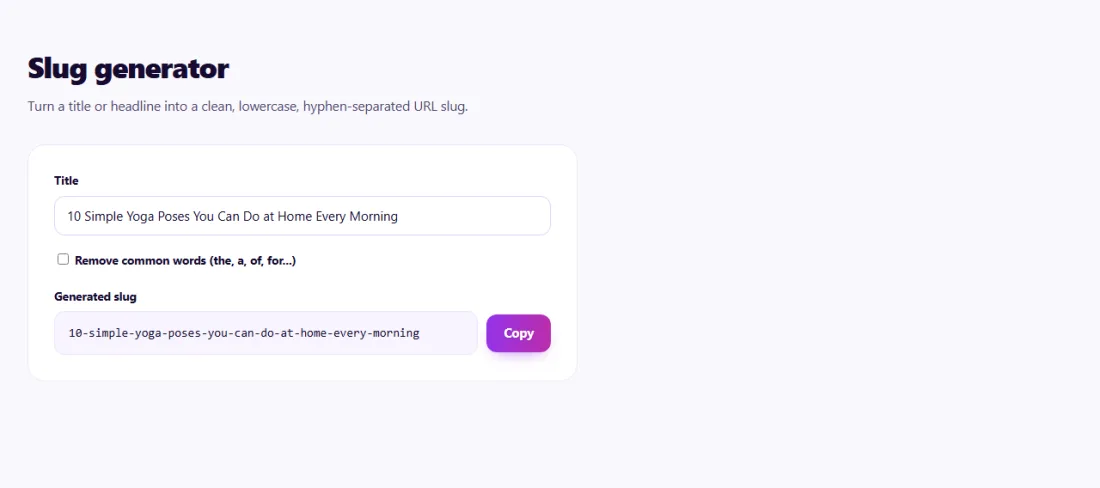
  1. 1Type a title to get a clean, lowercase, hyphenated URL slug.
    Step 1: Type a title to get a clean, lowercase, hyphenated URL slug.

Features of the URL Slug Generator

  • Clean conversion. Turns any title into a lowercase, hyphen-separated slug.
  • Accent and symbol handling. Removes characters that do not belong in URLs.
  • Optional stop-word removal. Drop small words such as "the" and "of" to keep slugs short.
  • Instant and private. Runs in your browser with nothing sent anywhere.

Who is it for?

  • Bloggers: create neat URLs for every post.
  • Online stores: keep product URLs consistent across the catalogue.
  • Developers: test how titles will turn into URLs.
  • Content teams: agree on a standard URL format.

Understanding your results

Copy the slug into the URL or permalink field of your content management system. If it still looks long, remove words that add nothing — dates, filler words or repeated terms — while keeping the main topic.

For pages that are already published, only change the slug if the benefit is clear, and always add a 301 redirect from the old address.

Example: tidying URLs for a new blog

A yoga studio in Barcelona was setting up a blog, and its platform created slugs such as /10-simple-yoga-poses-that-you-can-do-at-home-every-morning-2026.

Using the Slug Generator with stop-word removal, the studio created short slugs like /simple-morning-yoga-poses-at-home, without the year so posts could be updated later without changing their address. Because the blog was new, nothing needed redirecting, and every future post followed the same short, readable pattern.

Common mistakes to avoid

  • Including dates in slugs for content that is not time-specific.
  • Changing published slugs without redirects.
  • Using underscores, capitals or spaces.
  • Creating very long slugs that repeat the full title.

Frequently asked questions

Should slugs include the main keyword?

Yes, where it reads naturally — it helps people understand the page at a glance.

Are hyphens or underscores better?

Hyphens. Google treats them as word separators; underscores join words together.

What happens to accents and symbols?

They are converted to plain letters or removed, giving a URL that works everywhere.

Should I change existing slugs?

Only when the benefit is clear, such as very messy URLs. Every change needs a 301 redirect from the old address and updated internal links.

How long should a slug be?

As short as possible while still describing the page — often three to six words.

Should slugs include dates?

Only for content tied to a date, such as news. Dates make evergreen content look outdated and complicate updates.

Is my data private?

Yes. URL Slug Generator runs entirely in your browser — nothing you type or paste is sent to or stored by SeoSpidie.

Is it free?

Yes. The URL Slug Generator is free to use with no sign-up. SeoSpidie is supported by advertising.

From the blog
Duplicate Without User-Selected Canonical: What It Means and How to Fix It
Why Search Console reports duplicates with no chosen canonical, when it matters, and the fixes that settle it.
AI Crawler Checker: See Which AI Bots Can Crawl Your Website
Check, bot by bot, which AI crawlers your robots.txt allows or blocks, and create a starter llms.txt in the same place.
How to Find Low Competition Keywords for a New Website
A free, practical method to spot keywords where the current results are weak, so a new site can rank sooner.
Core Web Vitals Explained for Beginners: LCP, INP and CLS
What LCP, INP and CLS measure, the scores to aim for, and the simple fixes that make the biggest difference.
How to Update Old Blog Posts to Improve Rankings
A repeatable process for choosing which old posts to refresh and what to change so they climb back up.
Local Business Schema Markup: Example and Step-by-Step Setup
What LocalBusiness schema includes, a field-by-field example, choosing the right subtype and testing it properly.
How to Check If a Page Is Indexed by Google (4 Free Ways)
Four free ways to see whether Google has indexed a page, and what to do when it has not.
One Product Feed for Multiple Channels: Google, Facebook, Pinterest and More
How to manage one source of product data and export consistent feeds to every sales channel, without errors.
How Long Should a Blog Post Be for SEO? An Honest Answer
Why there is no magic word count, and how to decide the right length for each post from what searchers actually need.
How to Get Backlinks for a New Website (Free, Safe Methods)
Practical, free and policy-safe ways to earn your first backlinks, and the shortcuts that can get a new site penalised.